Unreal Engine 5 showcase

Showcase videos and C++ from my Unreal Engine 5 work, in C++ and Blueprints.

Globe project

An interactive globe built in Unreal Engine 5. Holographic panels show figures for each country (sample data in this build), light rings orbit the planet, and the scene is shown here under several environments and lighting setups.

Globe project in Unreal Engine 5 (1 min 24 s)

Gameplay systems in C++

Systems I've built in Unreal Engine 5 C++ and Blueprints for a multiplayer game: server-authoritative AI and a modular map and waypoint system. My focus is a modular, data-driven architecture with safe pointers (TObjectPtr/TWeakObjectPtr), const-correctness and early-out guards, plus ongoing profiling to keep gameplay smooth and the codebase scalable.

StateTree-driven animal AI, network-safe and data-driven

This AI chicken uses Unreal Engine 5's StateTree to drive clean, data-driven behavior switching (idle, wander, flee, death) while remaining fully server-authoritative and multiplayer-safe. The character owns its health and leash data, while the StateTree reacts purely to replicated state and gameplay events.
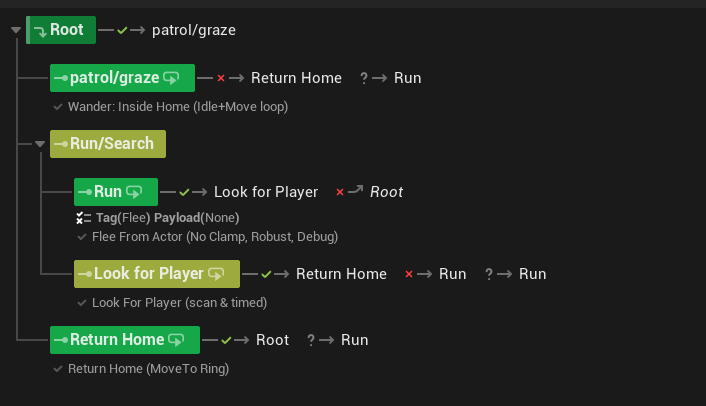
Chicken AI StateTree behaviour diagram
StateTree overview: graze or patrol, run, look for player, return home
Key design points:
  • Server-authoritative AI: All state changes originate on the server and replicate cleanly to clients.
  • Event-driven StateTree: AI reacts to gameplay events instead of polling or ticking heavy logic.
  • Safe multiplayer startup: Clients only start StateTree logic once replicated leash data is valid.
  • Component-based health: Death, cleanup, and destruction are handled through a reusable HealthGauge component.
Why this matters:
  • Easy to extend with new animals or behaviors
  • State logic lives in data, not hardcoded branches
  • Predictable replication and debugging
Leash initialization and StateTree bootstrapping
void AChicken::SetLeash_Implementation(
	const FVector& Center,
	float Radius,
	AActor* SpawnerOwner)
{
	if (!HasAuthority())
		return;

	HomeLocation = Center;
	WanderRadius = Radius;
	bLeashActive = true;
	OwningSpawner = SpawnerOwner;

	if (StateTreeComponent)
	{
		StateTreeComponent->SendStateTreeEvent(
			FStateTreeEvent(
				FGameplayTag::RequestGameplayTag(
					FName("AI.Event.SetLeash"))));
	}

	GetWorldTimerManager().SetTimerForNextTick([this]()
	{
		if (StateTreeComponent && !StateTreeComponent->IsRunning())
		{
			StateTreeComponent->StartLogic();
		}
	});
}

Modular map and waypoint system

The map and compass are fully modular: attach a UMapMarkerComponent to any Actor and it auto-registers on the map and compass. Designers can tweak the icon, size, color and visibility directly in the editor, with no hardcoded links. This is the waypoint add flow, which converts a screen click into a world-space marker and safely spawns it.

What’s happening here:
  • Subsystem gate & limit: Fetch UMapSubsystem. If invalid or at the 3-waypoint cap, exit early to keep UI readable and avoid spam.
  • Screen → widget space: Use GetCachedGeometry() + AbsoluteToLocal to map the click into the map widget’s local coords, then bounds-check.
  • Widget → world space: Delegate to ULandSubsystem::TextureToWorld so UI stays dumb; all terrain/UV mapping logic lives in the land subsystem.
  • Ground projection: UMapSubsystem::ProjectToGround snaps to terrain with a bounded trace (depth/step), so markers never float.
  • Spawn with ownership: Spawn the configured MarkerClass at the resolved position and set Owner to the local player for clean lifetime/relevance.
Why this design is solid:
  • Modular & editor-driven: Any Actor with UMapMarkerComponent auto-registers to Map/Compass. Icon, size, color, and visibility are editable per instance.
  • Const-correct, early exits: The UI call is const and cheap; invalid state bails immediately, keeping frame time predictable.
  • Safe pointers: Use IsValid(...) checks; store UObjects as TObjectPtr<> in owners, and external actor refs as TWeakObjectPtr<> to avoid dangling refs.
  • No transient allocs: Pure stack temps here; heavy work (traces, conversions) is bounded. No arrays/ToArray() churn in the hot path.
  • Separation of concerns: UI handles input & feedback, ULandSubsystem handles mapping, UMapSubsystem manages registration and projection.
Editor workflow (quick)
  • Add UMapMarkerComponent to any actor you want visible.
  • Tweak icon/size/visibility in Details; the component registers in BeginPlay().
  • Click the map to place up to three waypoints; markers appear on Map + Compass with distance/direction.
Waypoint placement, UI to world
void UWorldMapUI::AddWaypoint(const FVector2D ScreenPosition) const
{
    const UMapSubsystem* MapSubsystem = UMapSubsystem::Get(this);
    if (!IsValid(MapSubsystem) || MapSubsystem->RegisteredMarkers.Num() >= 3)
    {
        LOG_WARN(MapSystemLog, "Cannot add more than 3 waypoints. Remove one first.");
        return;
    }

    if (!MapTexture)
    {
        LOG_ERROR(MapSystemLog, "MapTexture border is null!");
        return;
    }

    const FGeometry Geo = MapTexture->GetCachedGeometry();
    const FVector2D LocalPt = Geo.AbsoluteToLocal(ScreenPosition);

    const FVector2D Size = Geo.GetLocalSize();
    if (LocalPt.X < 0 || LocalPt.X > Size.X || LocalPt.Y < 0 || LocalPt.Y > Size.Y)
        return;

    const ULandSubsystem* LandSubsystem = ULandSubsystem::Get(this);
    if (!IsValid(LandSubsystem)) return;

    FVector WorldPos = LandSubsystem->TextureToWorld(LocalPt, Size, 0.f);
    if (UMapSubsystem* MSS = UMapSubsystem::Get(this); IsValid(MSS))
    {
        WorldPos = MSS->ProjectToGround(WorldPos, 100000.f, 20.f);
    }

    if (IsValid(MarkerClass))
    {
        FActorSpawnParameters Params;
        Params.Owner = GetOwningPlayer();
        if (GetWorld()->SpawnActor<AActor>(MarkerClass, WorldPos, FRotator::ZeroRotator, Params))
        {
            LOG_INFO(MapSystemLog, "Spawned Marker at %s", *WorldPos.ToString());
        }
        else
        {
            LOG_ERROR(MapSystemLog, "Failed to spawn Marker actor!");
        }
    }
}

Third-person demo

Skating, AI and cinematics in one demo

  • Unreal Engine 5
  • C++
  • Blueprints
  • Lumen and Nanite

Made With UNREAL ENGINE 5, Where I made multiple mechanics and learned UNREAL ENGINE 5 Workflow

My learning outcomes from this project

  • Created Skate Mechanics for the Main character to move Quickly.
  • Created AI and Mechanics using a mix of Blueprints and C++ coding.
  • Created Third person Gameplay mechanics with different FOV for different movement modes.
  • Created Cinematics camera to show some story elements in the game.
  • Worked on Metahuman plugin from UNREAL to create some custom enemies for the game.
  • Used Lumen and Nanite and did optimizations for smoother FPS.

I learned a lot about the workflow of UNREAL ENGINE 5 and created this third person game demo.

University group project

Group project in the Unreal editor

Team lead on a UE5 project

  • Unreal Engine 5
  • C++
  • Team lead

In this project, using Unreal Engine 5, I not only familiarized myself with GitHub's code management and source control but also deepened my understanding of Unreal Engine. As the team project lead, I utilized GitHub boards to delegate tasks to team members and myself, diligently ensuring each task was completed within its set deadline before moving on to the next.

Want to talk Unreal?